






































Dispatch from live data instead of a whiteboard
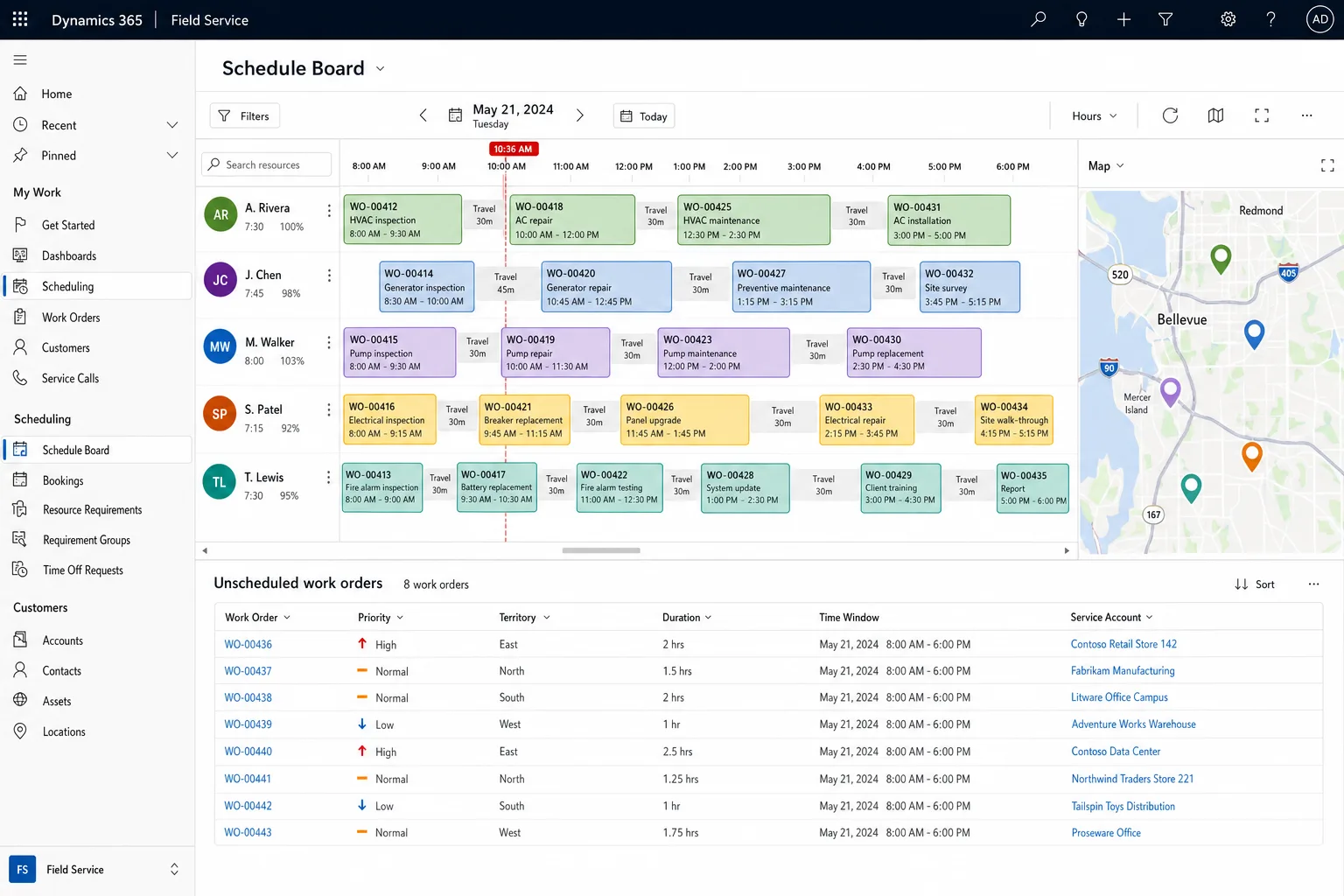
Dynamics 365 Field Service for service teams judged on response time. We pilot work orders, scheduling, SLAs and the technician app with one team on real jobs before the full rollout.
Free, 30 minutes, with a senior consultant. You leave with a recommended first phase or a clear reason to wait.

Where dispatch and SLAs go wrong
Field Service rollouts stall when scheduling logic, technician adoption and the back-office handoff are left until last.
Dispatch run on spreadsheets and phone calls
With the schedule on a whiteboard, every emergency call means a manual reshuffle. Routes get longer, repeat visits increase, and the whole operation depends on one hard-to-replace dispatcher.
A technician app that fails in the field
Technicians drop an app that fails offline, buries the work order or makes them re-enter data at the depot. Billing slips, and the real record stays on paper.
SLA breaches found by the customer
Without live SLA tracking, response and resolution clocks go unwatched until a penalty or a lost renewal eats the contract margin.
A stalled rollout with nothing live
Configuring every entitlement, IoT rule and routing constraint before go-live delays the first live work order. We put the core service flow live first and add the rest in releases.
What we configure in Field Service
Work order management
Create, schedule and track each job from request to resolution.
Service accounts
Service history and asset records for every customer, so technicians arrive knowing what is installed.
Agreements
Recurring agreements create their scheduled work orders automatically, so planned maintenance does not slip.
Entitlements
Each customer's coverage applies to every job, so billing matches the contract.
SLAs
Response and resolution targets with escalation before a deadline passes.
Copilot in Field Service
Drafts work orders from incoming requests for a dispatcher to review, and gives technicians guidance and knowledge articles on site.
Scheduling suggestions
Matches technicians to jobs by skill and location. The dispatcher confirms each booking.
Pilot on real jobs, then scale
Each release ends with something live you can measure against your SLAs before you continue.
- 01
Discovery and service blueprint
We map your work order lifecycle, entitlements, SLAs and dispatch rules with the people who run them.
- 02
Core setup and pilot
Work orders, the schedule board and the technician app go live for one service team, tested on real jobs from request to completion.
- 03
Scheduling and SLAs
We add scheduling suggestions, route optimization and live SLA and entitlement tracking, tuned to your skills, territories, hours and priorities. We test the results against past jobs, and dispatchers review each suggestion.
- 04
IoT and integrations
Equipment signals open condition-based work orders, and links to finance, inventory and CRM remove re-keying.
- 05
Rollout and launch stabilization
All service teams go live with role-based training, dispatcher and technician playbooks and a monitored stabilization window.
For teams judged on response time

Equipment alerts open work orders before a breakdown, so the technician brings the right part.
ManufacturingConnected to finance, inventory and CRM


Connected equipment
Azure IoT alerts open a work order before the customer calls.

Teams
Technicians reach an expert on a Teams call from site.

Microsoft 365
Customers get booking confirmations and arrival times by email.
Finance and inventory
Parts used and hours worked post to finance and stock.

CRM
Service history is visible to the account team.

Analytics
First-time fix rate and SLA results sit in Power BI.
How we reduce risk before you commit
One owner for the scheduling logic
The senior consultant who reviews your dispatch process in discovery tunes the scheduling rules and stays through launch stabilization, so the logic behind each booking has one owner. A dedicated project manager supports them.
A live pilot to judge
The pilot release runs on real jobs before you commit to the full program, so problems surface while they are cheap to fix.
Rules checked against your constraints
A senior consultant checks each routing rule and entitlement against your real territories, skills and contracts before go-live.
Fixed-scope releases
Each release has a defined outcome, a fixed scope and one named owner.
How to start with Field Service
Discovery sprint
A senior consultant reviews your dispatch process, data and SLAs, then hands you a prioritized roadmap, a pilot scope and a realistic timeline. Allow one to two weeks. The fee is fixed and credited against the pilot if you go ahead.
Pilot
Work orders, scheduling and the technician app live for one service team on real jobs, so you judge the system on your own work before a wider rollout.
Full phased rollout
Scheduling, SLAs, IoT, integrations and training for all service teams, scoped from the assessment.
Questions buyers ask
Does Field Service work offline?
Yes. The mobile app keeps work orders, checklists and parts usable without signal and syncs when the technician is back online.
Can it schedule technicians automatically?
It suggests technicians by skill, location and availability, and a dispatcher confirms the plan. We tune the rules to your contracts and response times.
Do we need connected equipment to start?
No. Teams usually start with work orders, scheduling and the mobile app, and add equipment alerts in a later release.