Lead and Opportunity management
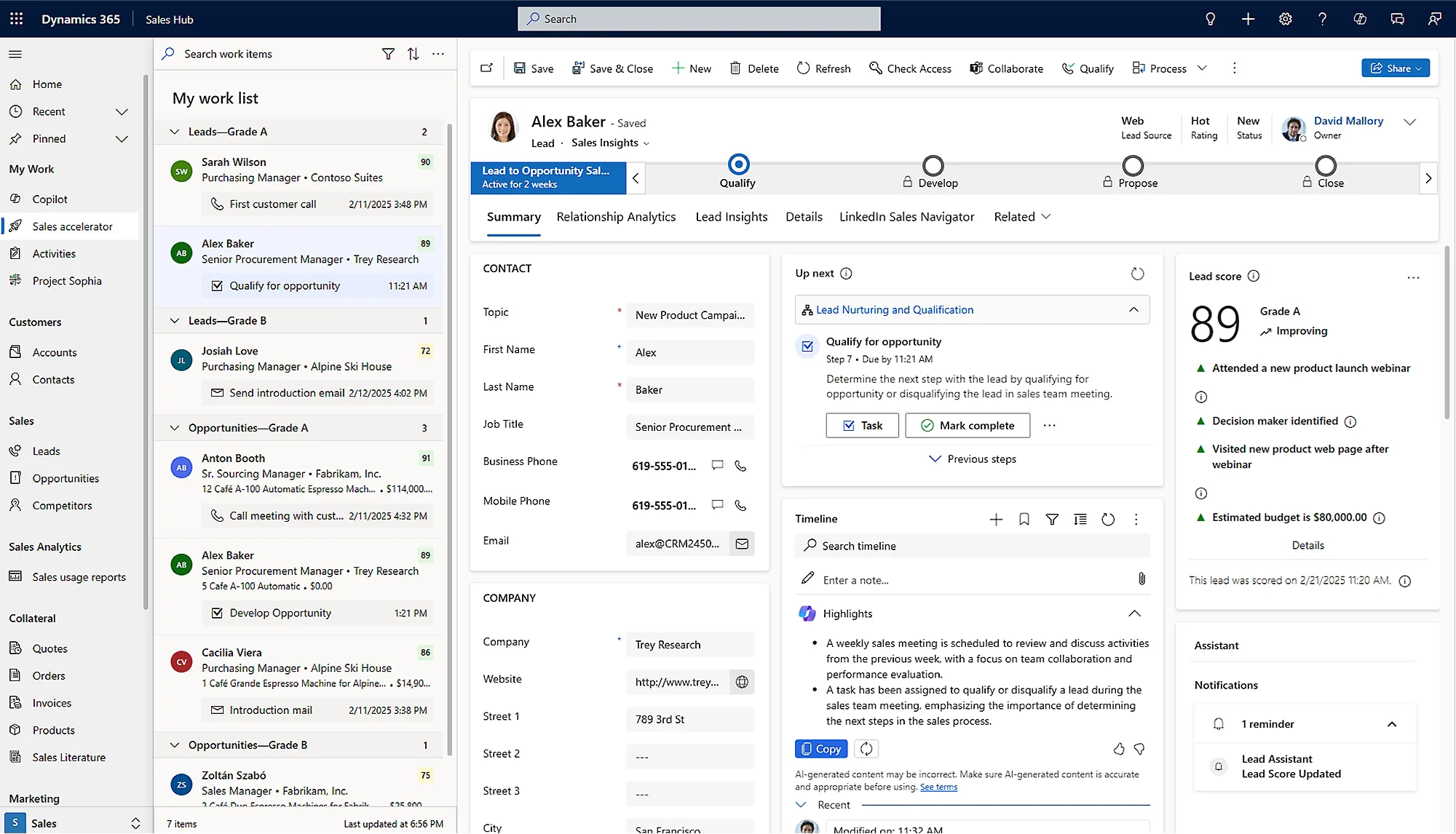
Capture, route, and qualify leads, then run every opportunity through to close.
We combine strategy, execution, and enablement so your ERP investment pays back fast.
Most Dynamics 365 Sales deployments don't fail at go-live. They fail in the quarter after, when forecasts drift, adoption sags, and the system becomes a place data goes to die.
Pipeline numbers are entered by hand, stale by Tuesday, and quietly overridden in a spreadsheet before every board meeting. When the forecast and reality disagree, leadership stops looking at Dynamics — and the investment becomes invisible.
If logging an activity takes longer than making the call, sellers skip it. Opportunities sit in stale stages, Copilot has nothing to summarise, and conversation intelligence captures empty rooms. Low-quality data poisons every AI feature you paid for.
Copilot and sales agents get demoed, then ignored — because nobody defined where the AI is allowed to act, what a human must approve, or how a drafted email becomes an accountable next step. Ungoverned AI in front of customers is a risk, not a win.
Pricing sits in one tool, approvals in email, contracts in a shared drive. Deals close in Dynamics but cash, terms, and renewals are reconstructed manually — so revenue ops can't tie a closed opportunity to what was actually sold.
A closer look at the product, screen by screen.
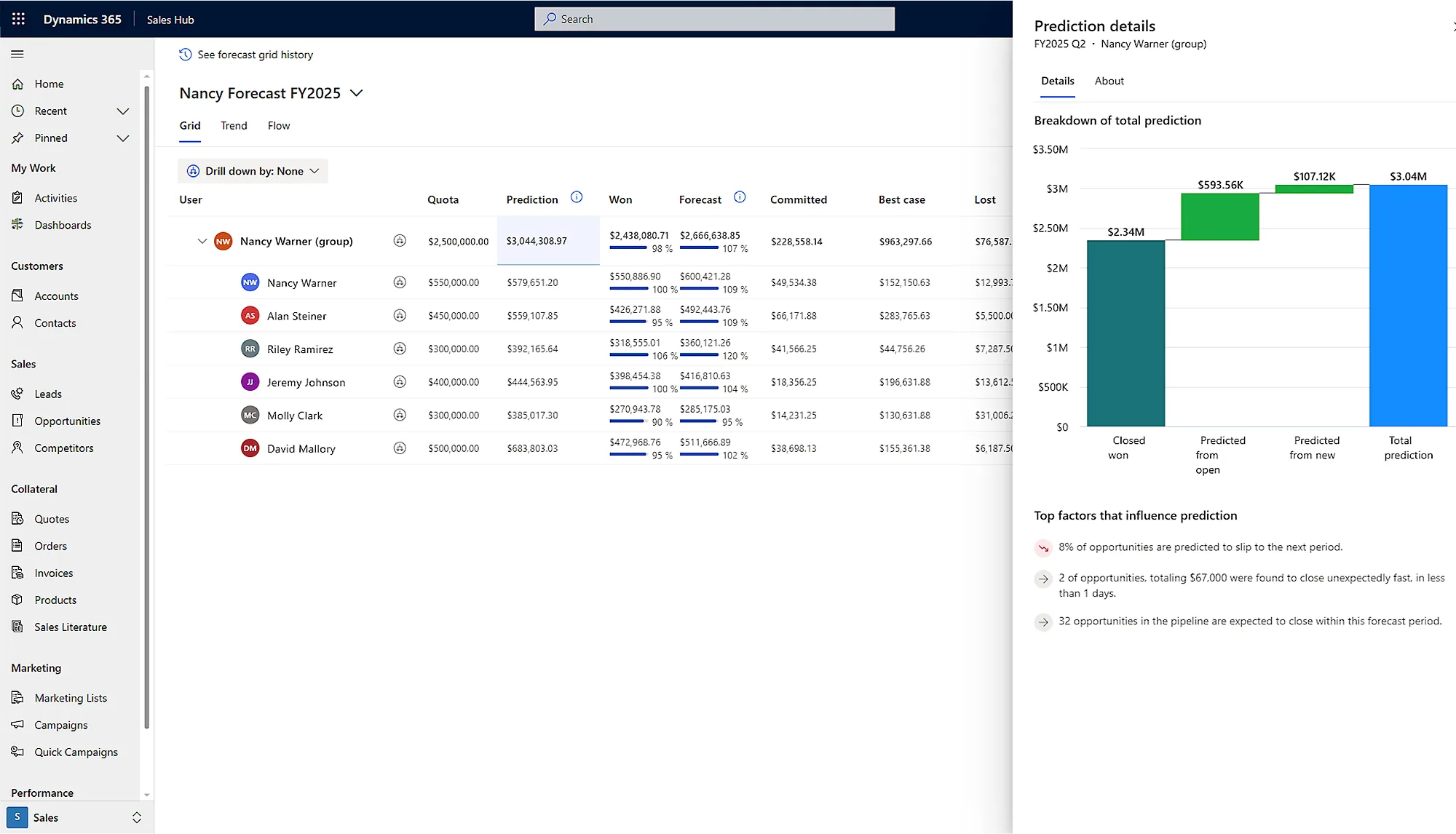
Roll quota, prediction, and won amounts into one forecast, with predictions that flag what is likely to slip.
Capture, route, and qualify leads, then run every opportunity through to close.
Predictive scores rank leads and deals so reps work the ones most likely to win.
See every stage of the pipeline and exactly what moved since you last looked.
Roll commit, best-case, and quota into one forecast with predictive signals.
Generate quotes, orders, and invoices on the record — no rekeying.
An autonomous agent handles routine follow-up, research, and nurture.
Qualifies inbound leads against your criteria before a rep picks them up.
Conversation and relationship analytics surface risk and the next best action.
Phased delivery means you see the first credible outcome in weeks, not after a year-long programme. These are the results our Dynamics 365 Sales engagements are built to hit.
First credible outcome
Dynamics 365 Sales earns its keep when it sits inside the tools your team already lives in — and ties cleanly to finance and data downstream.
Dynamics 365 Sales pays back fastest where deals have multiple stakeholders, real approvals, and a forecast leadership has to defend.
Quote configured products against live pricing, route approvals through the deal, and hand a clean order straight to Business Central — no rekeying.
Conversation intelligence and Copilot keep partner-led relationships documented, so pursuits survive staff changes and forecasts hold up to scrutiny.
AI sales agents qualify and route inbound leads, while pipeline scoring tells revenue ops which renewals and expansions actually close this quarter.
Mobile-first opportunity capture and auto-logged activity mean reps update deals between site visits instead of at midnight.
Repeat-order accounts get scored for churn and upsell, and quotes-to-orders flow without the back-office reconciliation tax.
We'd already tried Dynamics once and ended up running the real forecast in Excel. Flectic went live with one team in six weeks, switched on conversation intelligence so reps stopped logging by hand, and within a quarter our commit numbers actually matched what closed. The Copilot rollout was the first AI thing our sellers didn't quietly turn off — because they knew exactly what it would and wouldn't do for them.
We don't run a big-bang programme and hope. Each phase ships something usable, proves it with real sellers, then earns the next. Senior consultants own every phase; AI accelerates the work, humans sign it off.
We map your real sales motion — stages, qualification, approvals, what the forecast must answer — and agree the data model before we touch configuration. You leave with a scoped plan and a fixed view of phase one.
Lead and opportunity management, stages, and a clean Dataverse model go live for a single sales team. Outlook and Teams integration so capture is effortless. Real deals, real users, no theatre.
We switch on Copilot, conversation intelligence, and pipeline scoring with explicit guardrails: what the AI drafts, what a seller must approve, how a suggestion becomes an accountable action. Human-reviewed by design.
Quotes, orders, and contracts generated inside the opportunity, with approvals and e-signature wired in and a clean handoff to finance. Closed-won finally ties to what was actually sold.
We widen across teams, train managers on the forecast cadence, and instrument adoption in Power BI so you can see — not guess — whether the system is being used.
Risk in a CRM programme isn't dramatic — it's slow: drift, low adoption, a forecast nobody trusts. We engineer those failure modes out from day one.
The people in your discovery workshop are the people building your system. No bait-and-switch to juniors after the statement of work is signed.
Phase one stands alone. If the first pipeline isn't live, adopted, and useful, you stop — you're never locked into a year of spend before seeing proof.
Every Copilot and sales-agent capability ships with defined human-review points and clear boundaries on autonomous action, so AI accelerates sellers without acting unaccountably in front of customers.
We instrument usage from go-live, so 'is it working?' is answered with data on activity capture and forecast accuracy — and we course-correct before a quarter is lost.
Pick the entry point that matches where you are. Each one ends with something concrete you own.
Fixed fee, 1-2 weeks. You keep the plan whether or not you continue.
Stands alone — a usable CRM in weeks, not a year-long commitment.
Phased and gated — each stage earns the next on evidence.
We align every phase to outcomes, giving you confidence at each milestone.
Unified finance and inventory workflows across 5 regions.
Let’s build a focused plan that ships results this quarter.
Most clients see measurable improvements within the first 8–12 weeks.
Yes. We modernize, optimize, or re-platform based on ROI and risk.
Strategy, implementation, enablement, and optimization in one continuous plan.
Before you commit budget, get a clear-eyed read on readiness: your data model, forecast credibility, AI governance gaps, and the fastest route to a pipeline your reps will actually use. Senior-led, no obligation.
Schedule a 30-minute discovery call. We will map the fastest path to measurable results.