New: Odoo and Dynamics 365 cost calculators.Estimate your costs

Odoo for architecture and planning practices that bill by design phase.

Time tracking, phase fees, consultant costs and studio scheduling for practices of 20 to 100 people, so principals can step in while a phase still has fee left.

Book an ERP Readiness Call

Free, 30 minutes, with a senior consultant. You leave with a recommended first phase or a clear reason to wait.

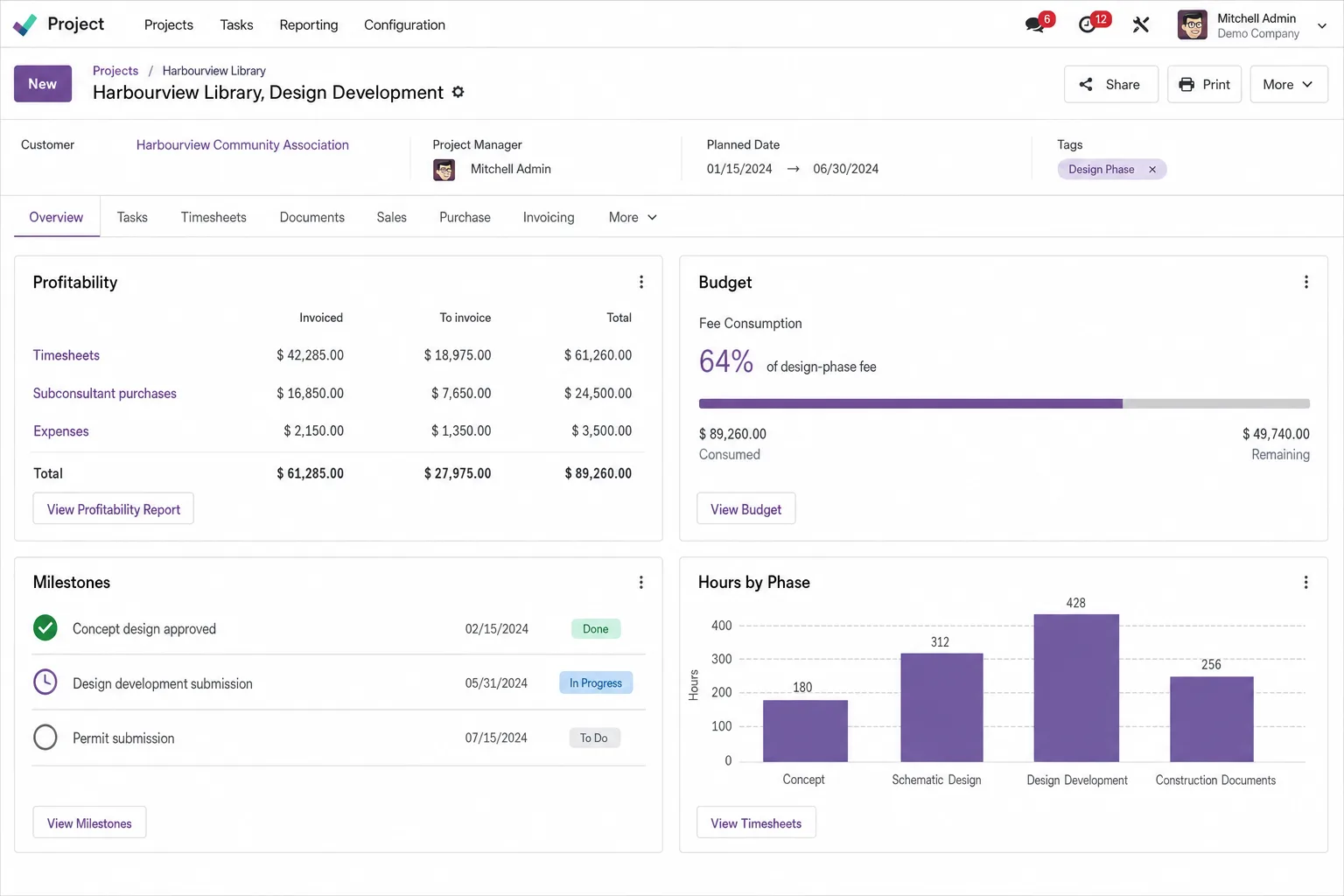
Odoo screen for architecture and planning

Know how much of each phase fee is used before the phase ends. Track fee used against every design phase, from schematic design to construction administration, with consultant fees and reimbursables charged to the project.

  • Fee used, phase by phase

    Every design phase carries its fee, its hours and its consultants, so you see how much is left before the phase closes.

  • Additional services, agreed and billed

    Extra work outside the agreed phases, such as added design options or revised submissions, is approved and added as its own fee line, so the hours have a fee behind them.

  • Studio capacity ahead of deadlines

    Planning shows who in the studio is booked on which project, so submission deadlines are staffed in advance.

Two scopes for architecture and planning practices

Core covers phase fees, time, consultant costs and studio scheduling. Choose Growth if you are hiring, plan leave around submission deadlines or answer a steady stream of RFIs during construction administration. Training, a dedicated project manager and launch stabilization are in both.

Core

For practices connecting phase fees, timesheets, consultants and studio scheduling.

DeliveryProposed 10 to 12 weeks

  • Customization: Up to 32 hours, for example phase and fee fields, additional-service requests, an approval for extra work and a site-observation worksheet.
  • AI use cases: 2 use cases, each tested by a Flectic consultant before go-live: minutes drafted from coordination-meeting notes, and incoming project documents and correspondence classified by project.
  • Data migration: 1 source system; up to 8 agreed data objects, such as the client list, open projects with their phase fees and the consultant directory.
  • Integrations: 1 named standard connector, chosen in discovery from those Odoo supports.
  • Launch stabilization: 30 business days; up to 10 advisory hours.
Scope the Core package for your firm

Growth

For practices that also want studio staff records, a client request desk and principal dashboards.

DeliveryProposed 12 to 16 weeks

Everything in Core, plus:

  • Customization: Up to 64 hours instead of 32, for example more phase types and additional approval rules.
  • AI use cases: Core's 2 use cases plus 3 more, such as fee-proposal drafts and up to 2 internal agents that look up your approved office standards for staff. A Flectic consultant tests each one before go-live, and the project architect checks every draft before it goes out.
  • Data migration: Up to 3 source systems instead of 1, with no limit on data objects, so past project fees or timesheet history can move where discovery agrees.
  • Integrations: Up to 3 named standard connectors instead of 1.
  • Launch stabilization: 45 business days instead of 30, with up to 22 advisory hours instead of 10.
Scope the Growth package for your firm

Timelines depend on scope, data readiness and timely client decisions.

From fee setup to first invoice: the Core rollout

A proposed 10 to 12 weeks across five stages. Growth adds a second test cycle and up to two rollout waves.

  1. 01

    Map phases and fee types

    We document your phases, for example schematic design, design development, construction documents and construction administration, with your fee structure, reimbursable rules, the one connector you need and up to 8 data objects to migrate.

  2. 02

    Set up phases and fees

    We spend up to 32 hours on customization, for example phase and fee fields, additional-service requests, an approval for extra work and a site-observation worksheet.

  3. 03

    Move clients and live projects

    We migrate the objects agreed in discovery, such as clients, open projects with their phase fees and consultants, from one source system, using clean templates you supply.

  4. 04

    Test a phase from fee to invoice

    One user acceptance test cycle takes a design phase through fee setup, timesheets, a structural or MEP consultant's bill and an invoice. Training follows: 6 two-hour sessions for up to 8 champions.

  5. 05

    Go live and stabilize

    The Flectic consultant who configured your fee structure supports the first 30 business days after go-live, with up to 10 advisory hours. Flectic stays on after that, with later changes scoped separately.

Core and Growth for a design practice, item by item

Growth includes everything in Core. Each row shows where Growth goes further.

DeliverableCoreGrowth
App coverageThe apps under Core below, set up for design phases, fees and studio scheduling.Everything in Core, plus the apps under Growth for studio staff and client requests.
CustomizationUp to 32 hours, for example phase and fee fields, additional-service requests, an approval for extra work and a site-observation worksheet.Up to 64 hours instead of 32, for example more phase types and additional approval rules.
AI use cases2 use cases, each tested by a Flectic consultant before go-live: minutes drafted from coordination-meeting notes, and incoming project documents and correspondence classified by project.Core's 2 use cases plus 3 more, such as fee-proposal drafts and up to 2 internal agents that look up your approved office standards for staff. A Flectic consultant tests each one before go-live, and the project architect checks every draft before it goes out.
Data migration1 source system; up to 8 agreed data objects, such as the client list, open projects with their phase fees and the consultant directory.Up to 3 source systems instead of 1, with no limit on data objects, so past project fees or timesheet history can move where discovery agrees.
Third-party integrations1 named standard connector, chosen in discovery from those Odoo supports.Up to 3 named standard connectors instead of 1.
Reporting4 configured native reports or views, such as fee used by phase, unbilled time, studio allocation and receivables.Core's 4 reports, plus 1 dashboard per module, covering phase effort and project margin.
Training6 two-hour sessions for up to 8 champions, such as principals, project architects and the practice manager; recordings and 8 process guides.As in Core: 6 two-hour sessions, up to 8 champions, recordings and 8 process guides.
Project managementDedicated manager; weekly 30-minute status meeting.Dedicated manager; weekly 1-hour status meeting instead of 30 minutes, plus a fortnightly steering review.
Testing and launch1 formal user acceptance testing (UAT) cycle plus defect retest; cutover rehearsal, sign-off and one go-live.2 UAT cycles instead of 1, plus cross-company and integration tests and up to 2 planned rollout waves.
Launch stabilization30 business days; up to 10 advisory hours.45 business days instead of 30, with up to 22 advisory hours instead of 10.
Delivery timeline10 to 12 weeks12 to 16 weeks

The Odoo apps for a design practice

Odoo appKey featuresWhat it does for your firm
ContactsCompanies; people; addresses; tagsMaintain owners, developers, authorities and subconsultants.
CRMLeads; pipeline; activities; forecastingTrack prospective projects, referrals and proposal follow-ups.
SalesQuotes; orders; pricing; billing policiesDefine design-phase fees and hourly or milestone billing.
SubscriptionsRecurring plans; invoices; renewalsManage ongoing planning-advisory service agreements.
AccountingLedger; receivables/payables; taxes; bank reconciliation; analyticsTrack project revenue, costs and the practice's finances.
ExpensesReceipts; approvals; reimbursement; reinvoicingCapture site travel, printing and recoverable disbursements.
ProjectTasks; stages; milestones; dependencies; profitabilityOrganize concept, design, coordination and submission phases.
TimesheetsTime entry; task allocation; validation; reportingMeasure effort by phase and staff member against agreed fees.
PlanningRoles; shifts; schedules; project allocationAllocate design teams across competing project schedules.
PurchaseSuppliers; RFQs; purchase orders; analytic allocationProcure structural, mechanical and landscape consultancy.
Field ServiceTasks; assignments; scheduling; worksheetsSchedule site observations and capture structured visit notes.
DocumentsFolders; tags; requests; sharing; access rightsOrganize briefs, submissions, correspondence and reference files.
SignTemplates; roles; signing order; request statusSign appointments, consultancy and additional-service agreements.
AppointmentsBooking types; availability; questions; remindersSchedule client consultations, presentations and reviews.
AIContextual drafting; summaries; classificationSummarize coordination notes and classify project documents.
StudioFields; views; layouts; automation; approval rulesConfigure phase records, fee fields and site worksheets.

Configuration focus. Phase records with fee fields, additional-service requests, reimbursable rules and a site-observation worksheet.

Feature coverage, budgets, company setup and accounting localization for your country are agreed during design. Invoicing sits within Accounting; Calendar handles meetings and reminders. Essential contact/staff records support the configured workflows. Odoo Enterprise with Studio-compatible licensing is assumed.

Questions buyers ask

Can we track fee used against each design phase?

Yes. Each phase is set up with its fee, and timesheets record studio hours against it, so the fee-used view compares hours and cost with the fee before the phase closes. That view can be one of the 4 reports configured in Core.

How are additional services handled?

Core sets up an approval for additional services. The right approver, usually a principal, signs off on the request and it becomes a separate line on the project's sales order, so the extra fee is invoiced with the phase.

Can consultant costs and reimbursables be tracked and recovered against each project?

Consultant appointments are raised in Purchase against the project's analytic account, so structural, MEP or landscape costs show on the project against its fee once each consultant's bill is posted. Reimbursables such as travel and printing can be re-invoiced at cost or at an agreed sales price, with the rules set in discovery.

Does Odoo replace our design software?

No. Odoo runs fees, time, consultants and billing. Your CAD and BIM tools stay in use, and project files can be stored or linked in Documents against each project.

What does Growth add for a design practice?

Growth keeps everything in Core. It adds staff records, hiring, leave planning, a client request desk and dashboards for principals. Customization rises to 64 hours, with up to 3 source systems and 3 connectors, and the proposed timeline is 12 to 16 weeks.

What sits outside the package price?

Odoo licenses (Enterprise is assumed), hosting, taxes and paid connectors are priced separately. Work after launch stabilization is scoped as a separate project, and the timeline depends on scope, data readiness and how quickly decisions are made.