New: Odoo and Dynamics 365 cost calculators.Estimate your costs

Odoo for contractors, from tender to handover.

For contractors who want quotations, job budgets, site schedules, procurement, labour and milestone billing in one system, with job costs visible while the work is still running.

Book an ERP Readiness Call

Free, 30 minutes, with a senior consultant. You leave with a recommended first phase or a clear reason to wait.

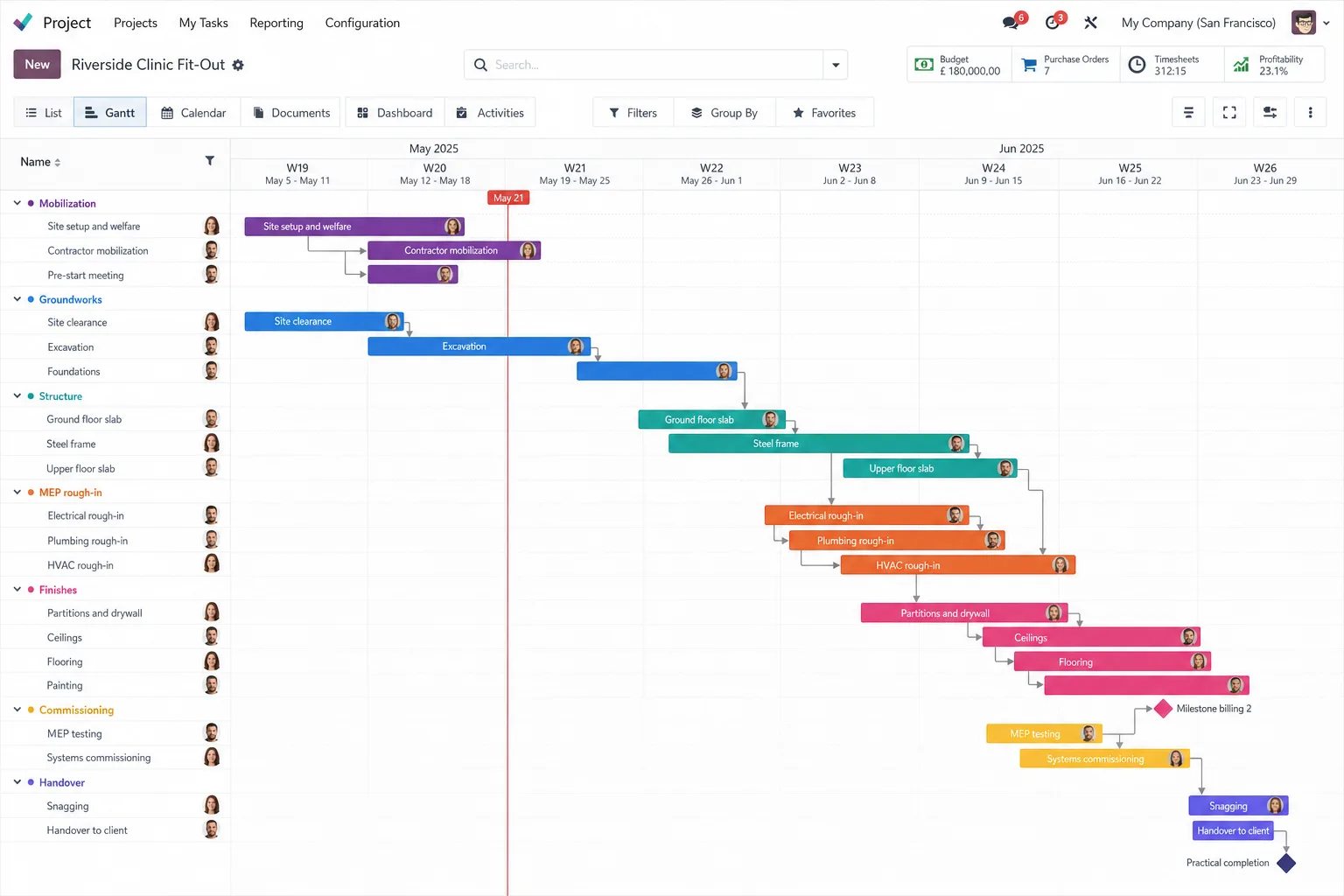
Odoo screen for construction

See what each job costs while the work is still running. Connect tendering, project controls, purchasing, site activity and job finances in Odoo.

  • Tender to handover

    Connect quotations, job budgets, site schedules, procurement, labour and milestone billing.

  • Job cost visibility

    Review recorded costs, purchase commitments and approved revenue against agreed cost codes.

  • Site and office coordination

    Share project records, site worksheets and handover evidence; Growth adds warranty support.

Core or Growth

Both include workflow adaptation, training, a dedicated project manager and launch stabilization.

Core

For contractors connecting tender-to-handover operations in one legal entity.

DeliveryProposed 18 to 22 weeks

  • Customization: Up to 48 hours: agreed fields/forms, one site worksheet, one approval flow and report adjustments.
  • AI use cases: 2 reviewed use cases: site-summary drafting from notes and project-document classification.
  • Data migration: 1 source; up to 8 data objects. Master data and opening/open transactions; client supplies clean templates.
  • Integrations: 1 named, available standard connector. Confirm objects and data direction during discovery.
  • Launch stabilization: 30 business days; up to 10 advisory hours.
Scope the Core package for your firm

Growth

For contractors adding estimating and wider controls across up to 2 legal entities.

DeliveryProposed 22 to 28 weeks

Everything in Core, plus:

  • Customization: Up to 96 hours instead of 48, adding bounded RFI, submittal and change registers, extra worksheets, approvals and dashboards.
  • AI use cases: Core's 2 use cases plus 3 more: change-request drafts and up to 2 approved-source agents, all with human review.
  • Data migration: Up to 3 sources and 16 data objects instead of 1 and 8, adding selected open jobs, budgets and equipment with agreed mappings and reconciliation.
  • Integrations: Up to 3 named standard connectors instead of 1. Any agreed payroll or specialist construction-system link counts within this limit.
  • Launch stabilization: 45 business days instead of 30, with up to 22 advisory hours instead of 10.
Scope the Growth package for your firm

Timelines depend on scope, data readiness and timely client decisions.

How the Core package is delivered

Core runs through the five stages every Flectic project uses. Growth adds a second test cycle and up to two rollout waves.

  1. 01

    Discover and scope

    We confirm scope, the named connector, data objects and data direction before configuration starts.

  2. 02

    Configure and adapt

    Up to 48 hours: agreed fields/forms, one site worksheet, one approval flow and report adjustments.

  3. 03

    Migrate and connect

    We migrate master data and open transactions from one source system, up to 8 agreed data objects, using clean templates you supply.

  4. 04

    Test and train

    One formal user acceptance testing (UAT) cycle plus defect retest, cutover rehearsal, sign-off and one go-live. Your champions train in 6 two-hour sessions for up to 8 people, with recordings and process guides.

  5. 05

    Launch and stabilize

    After go-live, 30 business days of launch stabilization with up to 10 advisory hours from the consultant who built it.

Core and Growth, deliverable by deliverable

Growth includes everything in Core. Each row shows where Growth goes further.

DeliverableCoreGrowth
Configuration focusTender-to-handover operations for 1 legal entity.Everything in Core, plus estimating and wider controls, for up to 2 legal entities with a common process.
CustomizationUp to 48 hours: agreed fields/forms, one site worksheet, one approval flow and report adjustments.Up to 96 hours instead of 48, adding bounded RFI, submittal and change registers, extra worksheets, approvals and dashboards.
AI use cases2 reviewed use cases: site-summary drafting from notes and project-document classification.Core's 2 use cases plus 3 more: change-request drafts and up to 2 approved-source agents, all with human review.
Data migration1 source; up to 8 data objects. Master data and opening/open transactions; client supplies clean templates.Up to 3 sources and 16 data objects instead of 1 and 8, adding selected open jobs, budgets and equipment with agreed mappings and reconciliation.
Integrations1 named, available standard connector. Confirm objects and data direction during discovery.Up to 3 named standard connectors instead of 1. Any agreed payroll or specialist construction-system link counts within this limit.
Reporting4 reports/views: job profitability, budget consumption, procurement commitments and receivables.Core's 4 reports, plus 1 native dashboard per agreed functional module with defined job and portfolio KPIs for margin, labour, procurement, equipment and cash.
Training6 two-hour sessions; up to 8 champions. Recordings and 8 guides, including a foreman/site-user workflow.8 two-hour sessions instead of 6, up to 12 champions instead of 8, and 12 guides with role-based office and site training.
Project managementDedicated manager; weekly 30-minute status meeting.Dedicated manager; weekly 1-hour status meeting instead of 30 minutes, plus a fortnightly steering review.
Testing and launch1 formal user acceptance testing (UAT) cycle plus defect retest; cutover rehearsal, sign-off and one go-live.2 UAT cycles instead of 1, plus cross-company and integration tests and up to 2 planned rollout waves.
Launch stabilization30 business days; up to 10 advisory hours.45 business days instead of 30, with up to 22 advisory hours instead of 10.
Delivery timelineProposed 18 to 22 weeks.Proposed 22 to 28 weeks.

The Odoo apps in each package

Odoo appKey featuresWhat it does for your firm
Construction BuilderIndustry setup; app bundle; project templatesStart with Odoo's contracting setup; validate templates against your workflows.
ContactsCompanies; people; addresses; tagsManage owners, trades, suppliers and site contacts.
CRMLeads; pipeline; activities; forecastsTrack tender deadlines and bid/no-bid decisions.
SalesQuotes; orders; down payments; milestonesQuote lump-sum, unit-rate or time-based work; identify approved variations.
Accounting / InvoicingLedger; receivables/payables; localization; analytics; budgets; assetsTrack job revenue, cost codes, budgets and commitments; define WIP/holdbacks.
ExpensesReceipts; approvals; reimbursementCode site expenses to jobs; recover agreed charges.
ProjectTasks; dependencies; milestones; Gantt; profitabilityCoordinate mobilization, work packages, commissioning and handover.
TimesheetsJob time; validation; staff cost ratesCost site labour and supervision by job/task.
PlanningRoles; shifts; schedules; GanttSchedule supervisors and crews across jobs.
PurchaseRFQs; orders; agreements; bill control; analyticsCompare material/trade bids; order services and match receipts/bills.
InventorySites/stores; transfers; returns; lots/serials; valuationTrack materials and tools; define consumption separately from site transfers.
Field ServiceSite assignments; scheduling; time/materials; worksheetsRecord site work and completion evidence in one agreed worksheet.
DocumentsFolders; tags; permissions; versionsOrganize drawings, permits and handover records.
SignTemplates; signers; order; statusSign contracts, variations and handover records.
EmployeesStaff records; schedules; managers; skillsMaintain site/office staff data for planning and costing.
MaintenanceEquipment; requests; calendarsRegister plant/tools and schedule maintenance.
DiscussChannels; messages; record chatterCoordinate teams against project records.
CalendarMeetings; recurrence; remindersSchedule site reviews, inspections and closeout.
AIDrafts; summaries; classificationDraft site summaries and classify documents.
StudioFields; forms; views; reports; automation; approvalsAdapt site fields, one worksheet, one approval flow and reports.

Configuration focus. The Core apps above, configured for day-to-day operations.

Feature coverage, budgets, company setup and accounting localization for your country are agreed during design. Invoicing sits within Accounting; Calendar handles meetings and reminders. Essential contact/staff records support the configured workflows. Odoo Enterprise with Studio-compatible licensing is assumed.

Questions buyers ask

What does every package include?

Workflow adaptation, training, a dedicated project manager and launch stabilization. Core configures the apps for day-to-day operations, and Growth adds people operations, client support and management dashboards.

Does Growth include everything in Core?

Yes. Growth keeps every Core deliverable and adds the Growth apps, more customization hours, more AI use cases, more data sources and connectors, and a longer launch stabilization.

How long does it take?

Core is proposed at 18 to 22 weeks and Growth at 22 to 28 weeks. Timelines depend on scope, data readiness and timely client decisions.

Which Odoo edition do you assume?

Odoo Enterprise with Studio-compatible licensing. Accounting localization for your country, budgets and company setup are agreed during design.

What do the AI use cases cover?

Core includes two: site-summary drafting from notes and project-document classification. Growth: Core's 2 use cases plus 3 more: change-request drafts and up to 2 approved-source agents, all with human review. A consultant checks each output before your team uses it.

What is not included?

Software licenses, hosting, taxes and paid connectors are confirmed separately. Work after launch stabilization is scoped as a new phase.