






































An employee record HR, finance and managers agree on
Dynamics 365 Human Resources for companies whose operations depend on headcount. Employee records, leave, compensation and payroll data run on one system, rolled out in releases planned around your pay cycle.
Free, 30 minutes, with a senior consultant. You leave with a recommended first phase or a clear reason to wait.

HR data sits in separate files
HR teams often have plenty of systems and still no employee record everyone accepts.
The system of record is a spreadsheet
HR, finance and managers keep headcount, leave and org structure in separate files, and reconciling them for an audit takes days. Dynamics 365 Human Resources can be the master record if employee, position and org data is modeled correctly at the start.
Leave is calculated by hand
Accruals are calculated by hand, managers read carry-over rules differently, and statutory entitlements drift. Each error risks a grievance or legal claim, and employees stop trusting their self-service balances.
Payroll and benefits don't reconcile
Compensation changes approved in one system miss payroll in another, and benefits sit in a third. One mismatched record can underpay an employee and force a finance correction.
Rollouts stall at go-live
Big-bang HR projects break down over data migration, the payroll and finance links, and staff resistance, and the platform takes the blame for scope and sequencing mistakes.
What we configure in Human Resources
Employee management
One record for each employee, role and reporting line.
Leave and absence management
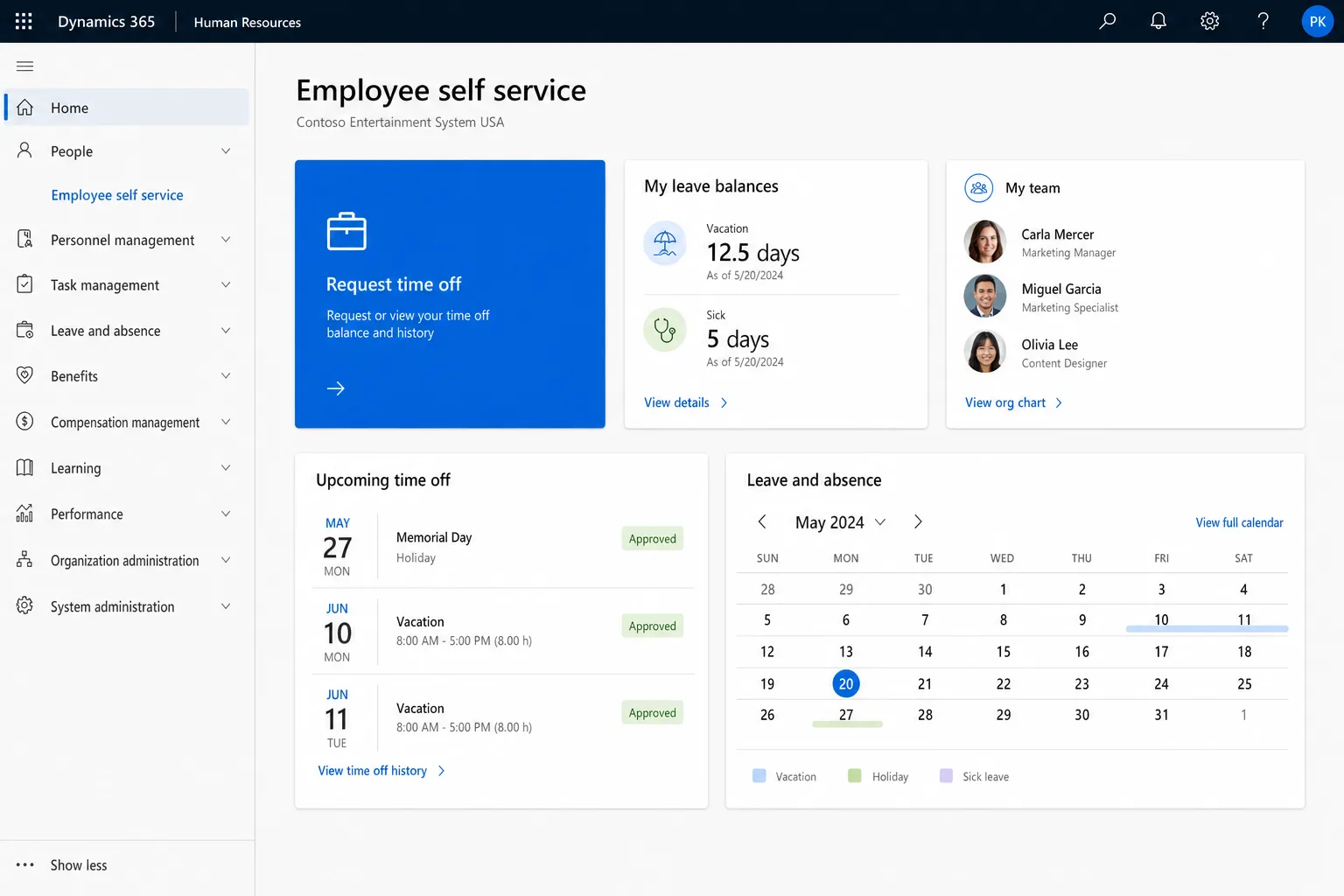
Time off is requested, approved and tracked, with balances calculated against policy.
Benefits and compensation management
Benefits and pay structures sit on the same employee record.
Performance management
Goals, reviews and development tracked through the year.
Administrative workflow automation
Routine HR forms and approvals move through set workflows without email chasing.
Employee self-service assistance
Through the Microsoft 365 Copilot Employee Self-Service agent, employees get answers and finish routine tasks without raising a ticket. HR reviews the answers.
Released around your pay cycle
Each release goes live and earns trust before the next begins, so nothing half-built runs into a payroll run.
- 01
Discovery and data readiness
We map org structure, positions, leave policies and payroll dependencies, and assess your source data. You also get a view of migration risk.
- 02
People, positions and org
We configure and migrate employee and org management, the base for every later release, and validate the data before go-live.
- 03
Leave, absence and self-service
Accruals, approval workflows and self-service go live, with HR reviewing the answers the Microsoft 365 Copilot Employee Self-Service agent gives employees. HR stops reconciling leave spreadsheets by hand.
- 04
Compensation, benefits and payroll
We model pay structures and benefits, then build and validate the finance and payroll integrations. They come after the core is stable because they carry the most risk.
- 05
Performance, then launch stabilization and handover
Performance reviews and goals follow once the core is proven. We connect your applicant tracking system if hiring data needs to reach the employee record. Then we work with your team through the first full payroll cycle, fix issues, then hand over documentation and trained admins.
For companies whose operations depend on headcount

Shift patterns, accruals and positions feed labor cost to finance with a full audit trail.
ManufacturingConnected to your existing systems

Microsoft Entra ID
Starters get their accounts on day one and leavers lose access the same day.

Teams
Staff request leave and managers approve it inside Teams.
Microsoft 365
Absences show in Outlook calendars and staff lists stay current.
Finance
Headcount costs post to finance by cost centre.

Analytics
Turnover and absence trends sit in Power BI.


Recruiting
New hires arrive with their applicant record attached.
How we protect people data
One owner for the payroll handoff
One senior consultant owns the employee data model and the payroll interface from discovery through launch stabilization, with a dedicated project manager alongside.
Fixed-scope releases at a set price
Each release has a deliverable, a duration and a price. You can stop after any release with a working system.
Consultant sign-off on people data
Before anything touches employee records, a senior consultant reviews the AI-drafted data-mapping documents and test scenarios, and signs off anything that touches payroll.
Data validated before go-live
We reconcile every migrated record against source before anyone relies on a balance, pay figure or headcount.
Where an HR rollout starts
Discovery sprint
An org and data assessment, a leave and payroll policy review, a migration risk report and a sequenced plan with a price for each release. It takes one to two weeks for a fixed fee, credited against the core go-live if you go ahead.
Core go-live
Employee, position, org, leave and absence management, migrated, validated and live with self-service.
Full program
Compensation, benefits, payroll integration and performance, followed by launch stabilization and handover. Scope is locked per release, and later work is scoped as its own phase.
Questions buyers ask
Does Dynamics 365 Human Resources run payroll?
No. It manages employees, positions, leave and benefits, and sends the data to your payroll provider through an integration we build and test before cutover.
Can managers approve leave in Teams?
Yes. Leave requests and approvals work inside Microsoft Teams, so managers approve them in the tool they already use.
What happens to our employee data during migration?
We move current employees, positions and leave balances, check them against payroll before cutover, and bring over only the history you need for reporting.