New: Odoo and Dynamics 365 cost calculators.Estimate your costs

Odoo for civil engineering firms, from design office to site.

Your engineers design roads, water and site development work, and your inspectors supervise it in the field. Odoo keeps submissions, inspection visits, field equipment and costs on the job they belong to.

Book an ERP Readiness Call

Free, 30 minutes, with a senior consultant. You leave with a recommended first phase or a clear reason to wait.

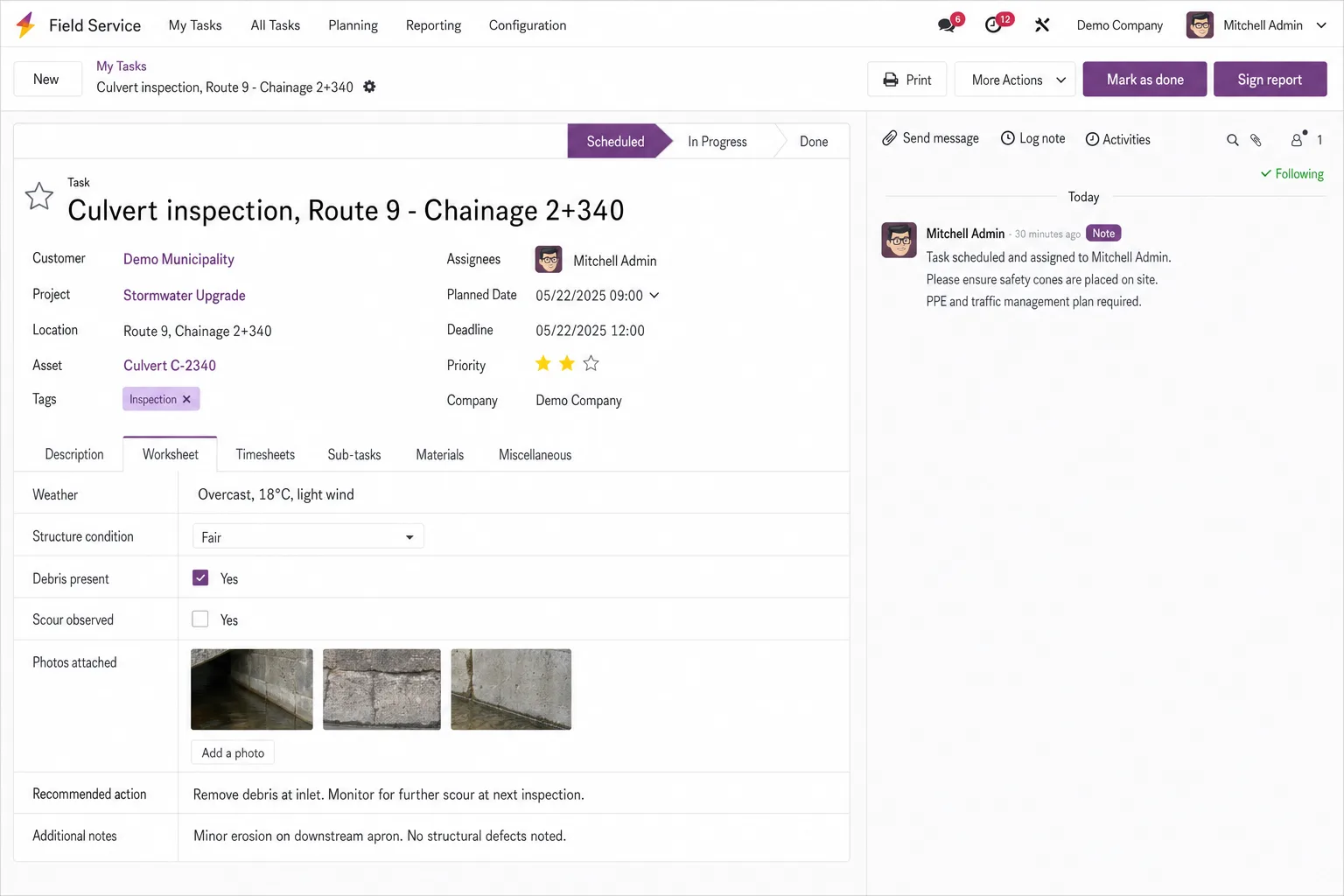
Odoo screen for civil engineering

Charge every design hour and site inspection to the right project. Follow each civil project from design submission to site supervision, with inspection visits, field crews, equipment and testing subcontracts charged to the job.

  • Design and site on one project

    Design packages, agency submissions and inspection visits sit on the same project, each with an owner and a due date.

  • Field costs that reach the job

    Inspection travel, field expenses and testing or geotechnical subcontracts post to the project they belong to.

  • Bids, inspectors and equipment in view

    Track public and private pursuits in CRM, schedule design staff and site inspectors in Planning, and see which equipment sits at which site.

Two scopes for civil engineering firms

Choose Core to put submissions, inspection visits, field equipment and job costs on each project. Choose Growth when you are hiring inspectors for new contracts and requests from municipalities and contractors need tracked response times. Training, a dedicated project manager and launch stabilization come with either.


Core

For firms connecting design submissions, site inspections, purchasing and field equipment.

DeliveryProposed 16 to 18 weeks

  • Customization: Up to 32 hours, for example inspection and site-visit worksheets, submission tracking fields and review steps.
  • AI use cases: 2 use cases, each tested by a Flectic consultant before go-live: drafting site-inspection summaries from field notes, and classifying incoming submissions, permits and correspondence.
  • Data migration: 1 source system; up to 8 agreed data objects, such as municipal and utility clients, open projects, suppliers and field equipment.
  • Integrations: 1 named standard connector, with the data it sends and receives agreed in discovery.
  • Launch stabilization: 30 business days; up to 10 advisory hours.
Scope the Core package for your firm

Growth

For firms adding field and office staff records, a request desk for clients and agencies, and project dashboards.

DeliveryProposed 18 to 20 weeks

Everything in Core, plus:

  • Customization: Up to 64 hours instead of 32; this is where bounded issue, RFI or change-request registers can be added.
  • AI use cases: Core's 2 use cases plus 3 more, such as drafts of responses to review comments and up to 2 internal agents grounded in your inspection procedures and design standards. A consultant tests each one before go-live, and your project engineers check the drafts before they are sent.
  • Data migration: Up to 3 source systems instead of 1, with no limit on data objects, for example open purchase orders or equipment history, as agreed in discovery.
  • Integrations: Up to 3 named standard connectors instead of 1.
  • Launch stabilization: 45 business days instead of 30, with up to 22 advisory hours instead of 10.
Scope the Growth package for your firm

Timelines depend on scope, data readiness and timely client decisions.

Going live on Core in a civil engineering firm

Five stages over a proposed 16 to 18 weeks, covering the design office and the site teams. Growth adds a second test cycle and up to two rollout waves.

  1. 01

    Map projects, sites and equipment

    We document how design and supervision work is split, the inspection worksheets you need, the connector and up to 8 data objects to migrate.

  2. 02

    Set up worksheets and submissions

    Up to 32 hours of customization go to site-visit and inspection worksheets, submission tracking and the review steps.

  3. 03

    Move projects, agencies and equipment

    We migrate clients and agencies, open projects, suppliers and field equipment from one source system, using clean templates you supply.

  4. 04

    Test in the office and on site

    One user acceptance test cycle plus defect retest, for example a submission, an inspection visit and an invoice, then cutover rehearsal and sign-off. Training follows: 6 two-hour sessions for up to 8 champions.

  5. 05

    Go live and stabilize

    For 30 business days after go-live, the consultant who set up your worksheets handles fixes and questions, with up to 10 advisory hours. Flectic stays on after that, and further work is scoped as a new phase.

What Core and Growth cover for a civil engineering firm

Growth includes everything in Core. Each row shows where Growth goes further.

DeliverableCoreGrowth
App coverageThe Core apps below, set up for design packages, site visits and field equipment.Everything in Core, plus Growth apps for staff, client and agency requests, and dashboards.
CustomizationUp to 32 hours, for example inspection and site-visit worksheets, submission tracking fields and review steps.Up to 64 hours instead of 32; this is where bounded issue, RFI or change-request registers can be added.
AI use cases2 use cases, each tested by a Flectic consultant before go-live: drafting site-inspection summaries from field notes, and classifying incoming submissions, permits and correspondence.Core's 2 use cases plus 3 more, such as drafts of responses to review comments and up to 2 internal agents grounded in your inspection procedures and design standards. A consultant tests each one before go-live, and your project engineers check the drafts before they are sent.
Data migration1 source system; up to 8 agreed data objects, such as municipal and utility clients, open projects, suppliers and field equipment.Up to 3 source systems instead of 1, with no limit on data objects, for example open purchase orders or equipment history, as agreed in discovery.
Third-party integrations1 named standard connector, with the data it sends and receives agreed in discovery.Up to 3 named standard connectors instead of 1.
Reporting4 configured native reports or views, such as project margin, inspection visits by project, recoverable field expenses and receivables by client.Core's 4 reports, plus 1 dashboard per module, including budget consumption and field workload.
Training6 two-hour sessions for up to 8 champions, such as project engineers, site inspectors and finance; recordings and 8 process guides.Same as Core: 6 two-hour sessions, up to 8 champions, recordings and 8 process guides.
Project managementDedicated manager; weekly 30-minute status meeting.Dedicated manager; weekly 1-hour status meeting instead of 30 minutes, plus a fortnightly steering review.
Testing and launch1 formal user acceptance testing (UAT) cycle plus defect retest; cutover rehearsal, sign-off and one go-live.2 UAT cycles instead of 1, plus cross-company and integration tests and up to 2 planned rollout waves.
Launch stabilization30 business days; up to 10 advisory hours.45 business days instead of 30, with up to 22 advisory hours instead of 10.
Delivery timeline16 to 18 weeks18 to 20 weeks

The Odoo apps for office and field work

Odoo appKey featuresWhat it does for your firm
ContactsCompanies; people; addresses; tagsMaintain municipalities, contractors, utilities and project contacts.
CRMLeads; pipeline; activities; forecastingTrack public and private project opportunities and bid follow-ups.
SalesQuotes; orders; pricing; billing policiesQuote design, supervision and inspection services.
SubscriptionsRecurring plans; invoices; renewalsBill recurring inspection, monitoring and advisory services.
Accounting / InvoicingLedger; invoices; taxes; reconciliation; analyticsTrack project finances, analytic costs and collections.
ExpensesReceipts; approvals; reimbursement; reinvoicingRecord site travel and recover agreed field expenses.
ProjectTasks; stages; milestones; dependencies; profitabilityOrganize design packages, submissions and delivery responsibilities.
TimesheetsTime entry; task allocation; validation; reportingRecord office and field effort for costing and invoicing.
PlanningRoles; shifts; schedules; project allocationSchedule design staff and site teams across assignments.
PurchaseSuppliers; RFQs; purchase orders; analytic allocationProcure surveying, geotechnical, testing and specialist services.
InventoryProducts; locations; receipts; transfers; serial trackingTrack field supplies and equipment stock movements by location.
Field ServiceTasks; assignments; scheduling; worksheetsAssign site visits and capture structured observation worksheets.
DocumentsFolders; tags; requests; sharing; access rightsOrganize specifications, site records and submission files.
SignTemplates; roles; signing order; request statusSign appointments, consultancy contracts and service variations.
AppointmentsBooking types; availability; questions; remindersSchedule stakeholder reviews, client meetings and site coordination.
AIContextual drafting; summaries; classificationDraft site summaries from notes and classify incoming documents.
StudioFields; views; layouts; automation; approval rulesConfigure site fields and agreed observation or issue registers.

Configuration focus. Inspection and site-visit worksheets, submission tracking fields, review steps and stock locations for field equipment.

Feature coverage, budgets, company setup and accounting localization for your country are agreed during design. Invoicing sits within Accounting; Calendar handles meetings and reminders. Essential contact/staff records support the configured workflows. Odoo Enterprise with Studio-compatible licensing is assumed.

Questions buyers ask

Can site inspectors record visits from the field?

Yes. Field Service is switched on for each civil project, so inspection visits are assigned there and inspectors complete an agreed worksheet on a phone or tablet, with notes and photo fields built in Studio. Visit time posts to that project through Timesheets, and travel through Expenses.

How do we track submissions to municipalities and agencies?

Each submission is a task or milestone on the project with an owner, a due date and its documents. Core configures the submission fields and review steps; Growth can add bounded issue, RFI or change-request registers.

Can we bill design milestones and supervision hours on the same project?

Yes. Each service product carries its own invoicing policy, so design stages can bill by milestone and supervision by recorded hours, with tasks on the same project pointing to either order line. Recurring inspection or monitoring contracts bill through Subscriptions.

Does it track field equipment and supplies?

Core includes Inventory, set up with stock locations for your office, store and sites, so you can see where equipment and supplies are and move them between locations. Serial numbers can be tracked where you need them.

How are testing and geotechnical subcontract costs handled?

Purchase orders to testing and geotechnical subcontractors carry the project's analytic distribution, so their costs land on the job once the vendor bill is posted. Where your contract allows, the cost can be re-invoiced to the client through the project's sales order.

Does Growth keep everything in Core?

Yes, every Core deliverable stays. Growth adds field and office staff records, hiring, a request desk for clients and agencies and project dashboards, doubles customization to 64 hours and allows up to 3 source systems and 3 connectors. It runs a proposed 18 to 20 weeks.

What does the package leave out?

Odoo Enterprise licenses, hosting, taxes and paid connectors are priced separately, and work after launch stabilization is a new phase. Your CAD, survey and modelling software stays as it is.