New: Odoo and Dynamics 365 cost calculators.Estimate your costs

Odoo practice management for accounting firms that run on recurring work.

For bookkeeping, tax and advisory firms that handle monthly closes, year-ends and filing deadlines and need preparer and reviewer stages, client documents and fees on the same engagement.

Book an ERP Readiness Call

Free, 30 minutes, with a senior consultant. You leave with a recommended first phase or a clear reason to wait.

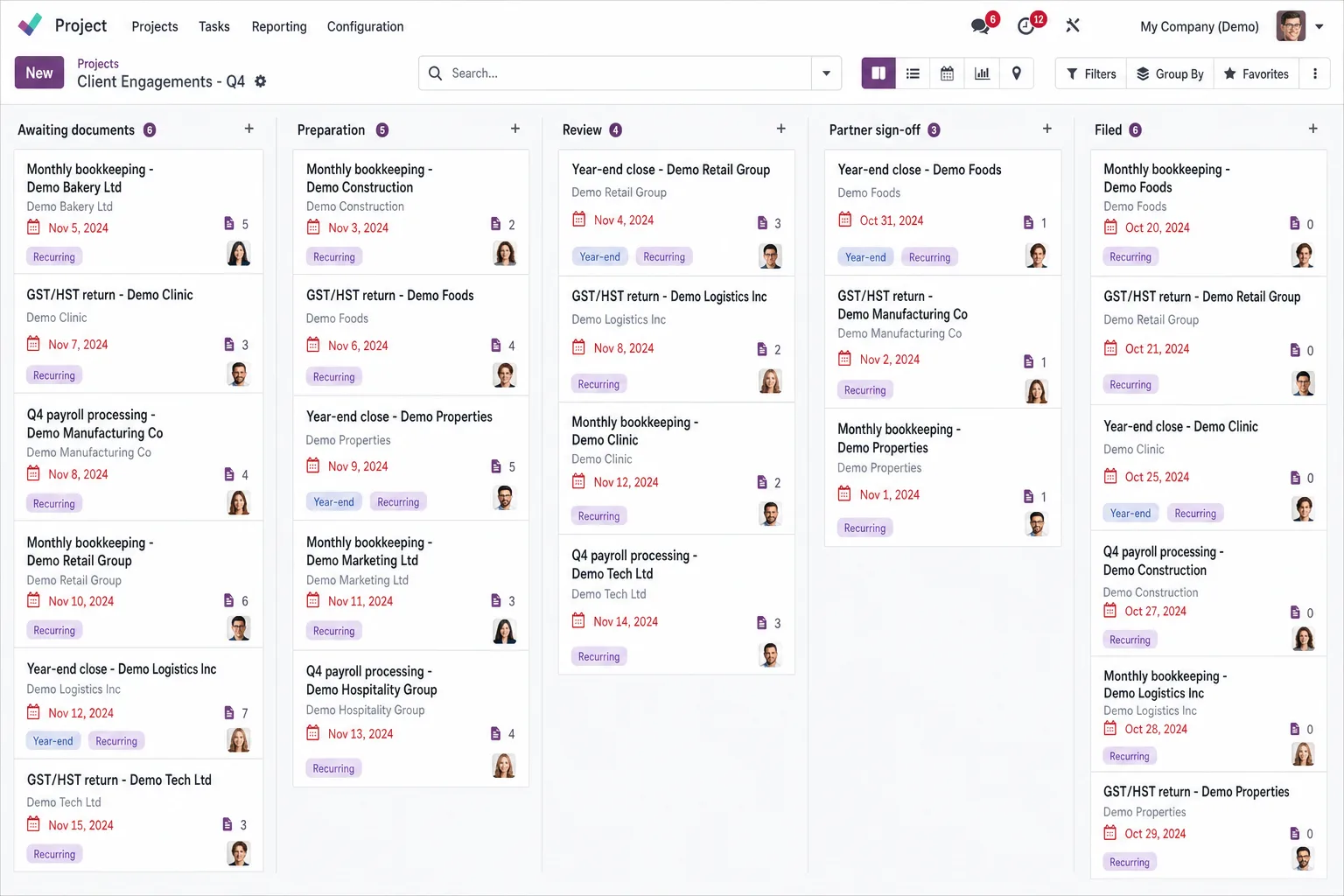
Odoo screen for accounting firms

Give every recurring engagement an owner, a deadline and a visible margin. Run monthly closes, year-ends and advisory work as recurring engagements, each with preparer and reviewer stages, client document requests and its fee.

  • Recurring work on a calendar

    Monthly, quarterly and year-end engagements come back each cycle, each with an owner, a preparer and a reviewer.

  • Review before it reaches the client

    Work moves from preparer to reviewer to sign-off, so partners see what is waiting for review before it goes to the client.

  • Fees that match the effort

    Fixed fees, hourly work and recurring retainers sit next to the time recorded, so you see which engagements earn their fee.

Core and Growth for accounting and bookkeeping firms

Core gets the engagement calendar, review stages, client documents, recurring fees and your own books running. Growth is for firms that staff up for busy season and want client questions logged with response times. Both include training, a dedicated project manager and launch stabilization.

Core

For firms connecting the engagement calendar, client documents, recurring fees and the firm's own books.

DeliveryProposed 8 to 10 weeks

  • Customization: Up to 32 hours, for example engagement fields, recurring task templates, proposal and engagement letter layouts and review approval steps.
  • AI use cases: 2 use cases, each tested by a Flectic consultant before go-live: one drafting workflow, such as client document requests, and one document classification workflow, such as sorting incoming client files.
  • Data migration: 1 source system; up to 8 agreed data objects, such as client entities, contacts, engagement types, recurring fees and open invoices.
  • Integrations: 1 named standard connector, picked in discovery, with its data direction agreed before setup.
  • Launch stabilization: 30 business days; up to 10 advisory hours.
Scope the Core package for your firm

Growth

For firms adding staff planning for busy season, a client service desk and partner dashboards.

DeliveryProposed 10 to 14 weeks

Everything in Core, plus:

  • Customization: Up to 64 hours instead of 32, for example more review stages or dashboard views.
  • AI use cases: Core's 2 use cases plus 3 more, such as engagement letter drafts and up to 2 internal agents that answer procedure questions from your firm manual. A consultant tests each one before go-live, and a manager checks every draft before it reaches a client.
  • Data migration: Up to 3 source systems instead of 1 and no cap on data objects, so past engagements or time history can move where agreed in discovery.
  • Integrations: Up to 3 named standard connectors instead of 1.
  • Launch stabilization: 45 business days instead of 30, with up to 22 advisory hours instead of 10.
Scope the Growth package for your firm

Timelines depend on scope, data readiness and timely client decisions.

Core in an accounting firm, in five stages

Core takes a proposed 8 to 10 weeks. Growth adds a second test cycle and up to two rollout waves.

  1. 01

    List engagements and services

    We map your services, recurring engagements, review stages and fee types, plus the connector and up to 8 data objects to migrate.

  2. 02

    Build the engagement templates

    Up to 32 hours of customization go to engagement fields, recurring task templates, proposal and engagement letter layouts and the review approval steps.

  3. 03

    Move clients and recurring fees

    Client entities, contacts, engagement types and recurring fees move from one source system, using import files you prepare from your current system.

  4. 04

    Test a sample month

    One user acceptance test cycle runs a sample month of engagements from document request to invoice, followed by 6 two-hour training sessions for up to 8 champions.

  5. 05

    Go live and stabilize

    Stabilization covers the 30 business days after go-live, which take in at least one month-end in the new system, with up to 10 advisory hours from the consultant who set it up. Flectic stays on after that, and later work is scoped as a new phase.

Item by item: what each scope covers for an accounting firm

Growth includes everything in Core. Each row shows where Growth goes further.

DeliverableCoreGrowth
App coverageCore's apps, listed below, set up for recurring engagements, client documents and fees.All of Core, plus the Growth apps listed below for staff and client service.
CustomizationUp to 32 hours, for example engagement fields, recurring task templates, proposal and engagement letter layouts and review approval steps.Up to 64 hours instead of 32, for example more review stages or dashboard views.
AI use cases2 use cases, each tested by a Flectic consultant before go-live: one drafting workflow, such as client document requests, and one document classification workflow, such as sorting incoming client files.Core's 2 use cases plus 3 more, such as engagement letter drafts and up to 2 internal agents that answer procedure questions from your firm manual. A consultant tests each one before go-live, and a manager checks every draft before it reaches a client.
Data migration1 source system; up to 8 agreed data objects, such as client entities, contacts, engagement types, recurring fees and open invoices.Up to 3 source systems instead of 1 and no cap on data objects, so past engagements or time history can move where agreed in discovery.
Third-party integrations1 named standard connector, picked in discovery, with its data direction agreed before setup.Up to 3 named standard connectors instead of 1.
Reporting4 configured native reports or views, such as engagements due by owner, the review queue, unbilled time by client and engagement margin.Core's 4 reports, plus 1 dashboard per module, for example workload by staff member and receivables.
Training6 two-hour sessions for up to 8 champions, such as partners, managers and senior staff; recordings and 8 process guides.No change from Core: 6 two-hour sessions, up to 8 champions, recordings and 8 process guides.
Project managementDedicated manager; weekly 30-minute status meeting.Dedicated manager; weekly 1-hour status meeting instead of 30 minutes, plus a fortnightly steering review.
Testing and launch1 formal user acceptance testing (UAT) cycle plus defect retest; cutover rehearsal, sign-off and one go-live.2 UAT cycles instead of 1, plus cross-company and integration tests and up to 2 planned rollout waves.
Launch stabilization30 business days; up to 10 advisory hours.45 business days instead of 30, with up to 22 advisory hours instead of 10.
Delivery timeline8 to 10 weeks10 to 14 weeks

The Odoo apps for running the practice

Odoo appKey featuresWhat it does for your firm
ContactsCompanies; people; addresses; tagsMaintain client entities, representatives and billing contacts.
CRMLeads; pipeline; activities; forecastingTrack advisory enquiries, follow-ups and new-business opportunities.
SalesQuotes; orders; pricing; billing policiesPrepare fixed-fee, hourly or milestone service proposals.
SubscriptionsRecurring plans; invoices; renewalsBill recurring bookkeeping, controller and advisory services.
AccountingLedger; receivables/payables; taxes; bank reconciliation; analyticsManage the firm's books, collections and service-line results.
ExpensesReceipts; approvals; reimbursement; reinvoicingReimburse staff and recover chargeable engagement expenses.
ProjectTasks; stages; milestones; dependencies; profitabilityCoordinate recurring engagements, deadlines and review tasks.
TimesheetsTime entry; task allocation; validation; reportingCapture billable effort and review engagement labour costs.
PlanningRoles; shifts; schedules; project allocationAllocate accountants and reviewers across client workloads.
DocumentsFolders; tags; requests; sharing; access rightsCollect client files and control access to engagement material.
SignTemplates; roles; signing order; request statusRequest signatures on engagement letters and service agreements.
AppointmentsBooking types; availability; questions; remindersLet clients book consultations and recurring review meetings.
AIContextual drafting; summaries; classificationDraft document requests and classify engagement information.
StudioFields; views; layouts; automation; approval rulesConfigure engagement fields, review steps and document layouts.

Configuration focus. Engagement fields such as entity type, year-end, preparer and reviewer, recurring task templates, proposal and engagement letter layouts and review approval steps.

Feature coverage, budgets, company setup and accounting localization for your country are agreed during design. Invoicing sits within Accounting; Calendar handles meetings and reminders. Essential contact/staff records support the configured workflows. Odoo Enterprise with Studio-compatible licensing is assumed.

Questions buyers ask

Can recurring engagements create their own tasks every month?

Yes. Odoo's recurring tasks create the next task when the previous one is marked done, with the deadline set by the repeat interval you choose, such as every month or every 3 months. Subscriptions bills the recurring fee separately, so fees and work stay linked by client.

How do preparer and reviewer stages work?

Each engagement task moves through the stages you define, from preparation to review to sign-off. Core includes review approval steps, so the reviewer's approval is recorded before the work is closed.

Can clients upload their documents?

Yes. Documents lets you request specific files, and clients upload them through a shared link with upload rights, without needing an Odoo user. Files go to the client's folder, with the access rights you set.

Does Odoo replace our tax or bookkeeping software?

No. In this package Odoo runs your firm: engagements, time, documents, billing and the firm's own books. Tax preparation and client-ledger tools stay as they are. If a standard connector exists for one of them, it can be your Core connector.

Can we bill from time, fixed fees and retainers and see unbilled work?

Yes. Timesheets and Subscriptions feed invoices, so fixed fees, hourly work and retainers sit next to recorded time. Unbilled time by client is a typical choice for one of Core's 4 reports, agreed in discovery.

Does Growth include everything in Core?

Yes. Growth is Core plus staff records, hiring ahead of busy season, leave planning around filing deadlines, a client service desk and partner dashboards. Customization goes from 32 to 64 hours, with up to 3 source systems and connectors, over a proposed 10 to 14 weeks.

When should we plan go-live?

We set the go-live date with you around your filing deadlines and aim to keep launch stabilization, 30 business days on Core and 45 on Growth, out of your busiest weeks.

What is priced separately?

Odoo Enterprise licenses, hosting, taxes and paid connectors. Work after stabilization is scoped as a new phase, and the timeline depends on scope, data readiness and decision speed.